Delete a Tag
Related
- Add a Tag to create a new one.
- Apply a Tag to attach an existing tag to an asset.
- Edit a Tag to change an existing tag.
- Concept: Tags Overview for tag types, inheritance, and quality-score impact.
This allows you to remove outdated or unnecessary tags to maintain a clean and efficient tag system.
Before You Delete
Deleting a tag is a hard delete. There is no archive step and no undo. Understand what goes with it before you confirm:
| What happens to... | Effect |
|---|---|
| The tag definition | Removed permanently from the tag list. |
| Assets currently tagged (datastores, containers, fields, checks) | The tag is stripped from every asset that carries it. Any influence that tag had on quality scores (through its weight modifier) is reflected on the next scan. |
| Anomalies that carry the tag | The tag is removed from existing anomalies too, including anomalies that inherited it from their check. |
| External tags synced from a data catalog | Not affected by this flow. External tags are managed at the source catalog. |
Irreversible
Once a tag is deleted, the definition cannot be recovered. You would need to recreate the tag with the same name, color, and weight modifier and reapply it to every asset.
Steps
Step 1: Click the vertical ellipsis (⋮) next to the tag that you want to delete, then click on Delete from the dropdown menu.
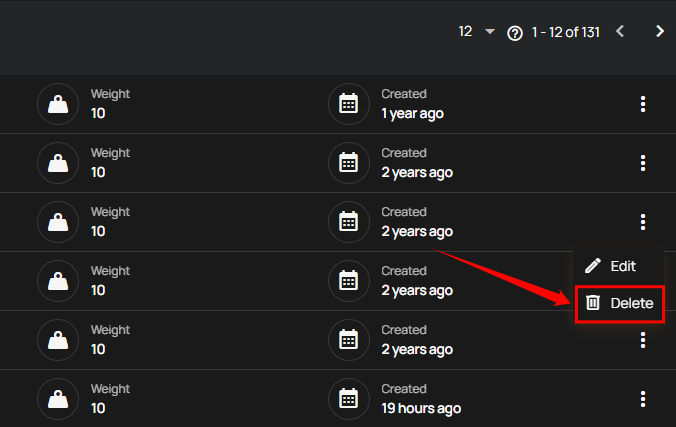
Step 2: After clicking the Delete button, your tag will be removed from the system, and a success message will appear.