Scan Operation
The Scan Operation runs a datastore's data quality checks against its containers (tables, views, or file patterns) and writes every identified anomaly to the linked Enrichment Destination. Defaults for source examples and record-anomaly limits come from the platform's Scan defaults and can be overridden in the scan form.
Note
On the datastore overview, the Get started in three steps widget keeps Scan disabled until the Sync and Profile operations have completed. Other entry points, such as the toolbar Run menu and the API, can start a scan at any time. A scan only applies active quality checks that already exist, so before your first scan, consider running a Profile with AI Effort enabled and activating any generated checks that remain in Draft.
A scan identifies two kinds of anomaly:
-
Record Anomalies: A single record (row) flagged as anomalous, with details on why. The simplest example is a row missing an expected value for a field.
-
Shape Anomalies: Structural issues at the column or schema level, such as missing fields or inconsistent patterns across the dataset.
Within the wizard you can:
- Choose between an incremental load and a full load.
- Automatically resolve previously open anomalies that no longer flag on a Full scan.
- Limit the number of records scanned.
- Pick which tables or file patterns to include.
- Schedule the scan to run later.
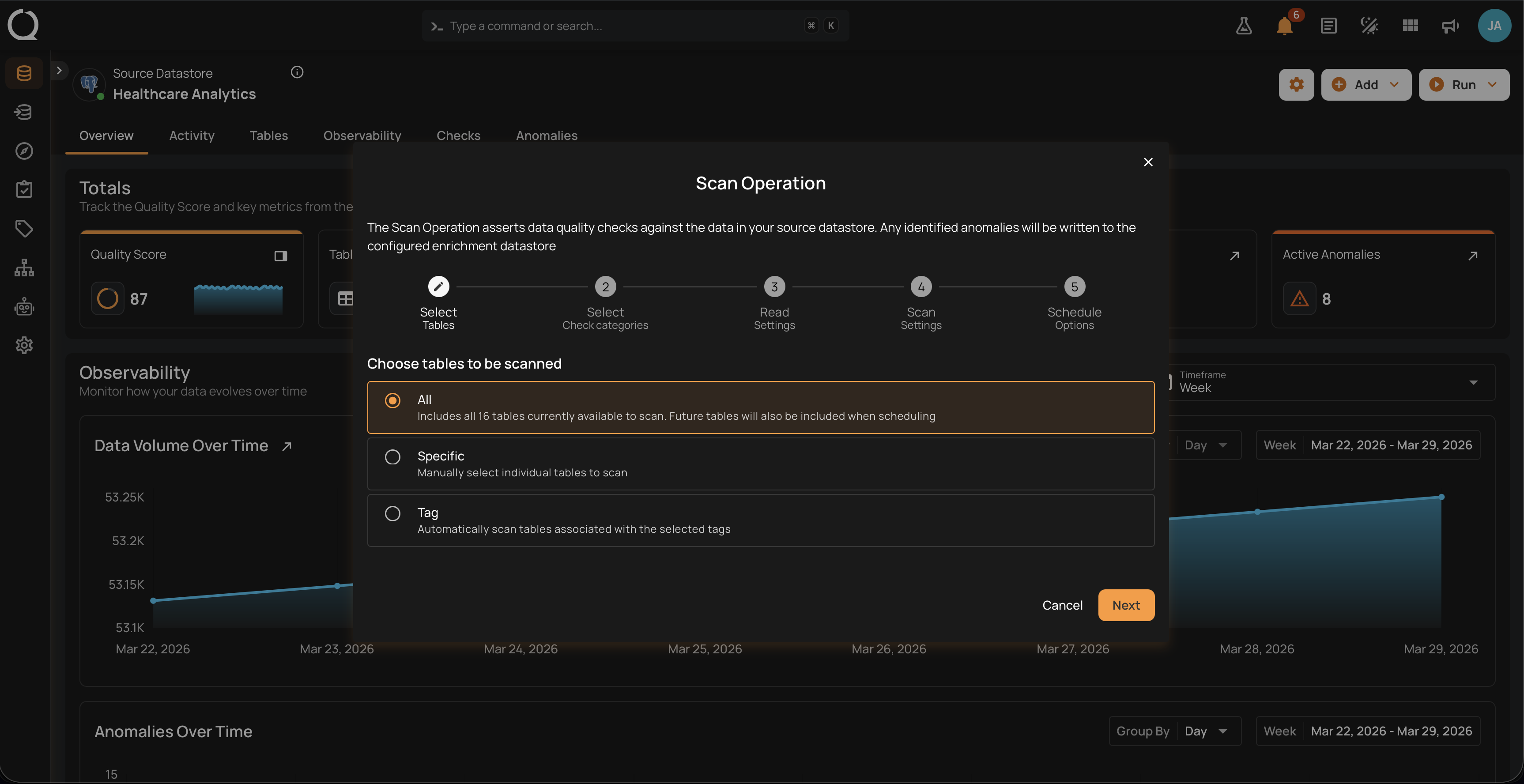
To open the Scan Operation modal, navigate to a source datastore from the side menu, click the Run dropdown in the top-right corner of the datastore page, and select Scan. The modal opens at Step 1, Select Tables on a database datastore or Select File Patterns on a file-based one, and the stepper at the top shows the full configuration flow.
Show me how
The app can walk you through this. Click Show me how in the Scan dialog's header, or press H while it is open, and the Run a Scan walkthrough highlights each step while you fill in the real form. See The How-tos Scope for every way to start one.
Deep Dive
-
Read Strategies
Incremental vs Full and Auto-Resolve behavior.
-
Scan Settings
Conceptual reference for every setting in the scan form.
-
Permissions
Who can run, schedule, and configure scans.
How-tos
The numbered cards walk through each step of the wizard. The two unnumbered cards cover post-scan analysis and the API helper for runtime variables.
-
Select Tables / File Patterns
Choose the containers to scan: All, Specific, or by Tag.
-
Select Check Categories
Choose Metadata, Data Integrity, or both.
-
Read Settings
Pick Incremental or Full, set an optional starting threshold, and the record limit.
-
Scan Settings
Anomaly Options (including Auto Resolve Anomalies, shown only when the read strategy is Full), record-anomaly limits, and source examples.
-
Schedule Options
Set up a recurring run, or skip this step and use Run Now.
-
Follow the Run
Follow the Scan Run on the Activity tab, from the row anatomy to its states, actions, and permissions.
-
Use Runtime Variables
Supply check variable values per scan, per schedule, or as container defaults.
Reference
-
Troubleshooting
Resolution steps for known errors.
-
API
Payload examples for run, schedule, and retrieve.
-
FAQ
Common questions.