Contains Email
Think of Contains Email as a pattern check for contact data.
Any time your system stores customer or user information, email addresses are often the primary identifier used for communication, login, billing, and notifications. This check evaluates whether the selected field contains a recognizable email address.
Add Contains Email Check
Use the Contains Email check to evaluate whether a selected field includes a recognizable email pattern and to surface records that do not match its criteria.
What Does Contains Email Do?
Contains Email can surface values with issues such as:
- Missing
@or domain name - Truncated or partially stored email values
- Corrupted email data during ingestion or transformation
- Non-email text accidentally stored in an email field
In simple terms: It checks for text that has a recognizable email structure. It does not confirm that the mailbox exists or can receive a message.
How Does Contains Email Work?
Step 1: Choose the Field
You select one field that is expected to contain an email address (for example: email, contact_details, or a JSON column containing email data).
Step 2: The Validation Happens
During a Scan, Qualytics evaluates each record in scope against the email pattern used by the rule.
Step 3: Get Your Results
- Pass: The field contains text that matches the email pattern.
- Anomaly Found: The value does not match the check criteria.
Why Should You Use Contains Email?
1. Prevent Broken Communication
If emails are malformed, automated messages can fail silently. Customers may not receive confirmations, alerts, or updates.
2. Improve Data Quality Upstream
Surfacing values that do not match the pattern can help teams investigate downstream issues in CRM systems, marketing tools, and analytics.
3. Avoid Operational Errors
Email values that do not match expected patterns can contribute to:
- Failed notifications
- Login issues
- Customer support escalations
- Exceptions to documented contact-data policies
Contains Email provides one quality signal for reviewing contact data.
Real-Life Example: Customer Contact Data Review
Let me walk you through a complete, real-world scenario:
The Situation
BrightCart is an online retail platform that collects customer contact details during account creation and checkout. Email addresses are critical because they are used for:
- Order confirmations
- Shipping notifications
- Password resets
- Customer support communication
Before sharing this data with marketing and support teams, the data team reviews whether the contact values meet its documented expectations.
The Problem They Had
Initially, the team relied on manual review to validate email data.
One week, customer support noticed an increase in complaints like:
- “I didn’t receive my order confirmation”
- “Password reset email never arrived”
When the data team investigated, they found that some customer records did not contain recognizable email addresses, but these issues had gone unnoticed during manual review.
After digging deeper, they discovered:
- The dataset had grown to tens of thousands of records
- Analysts were reviewing only a small sample due to time constraints
- Subtle issues (like missing domains or incomplete emails) were easy to miss
- Manual checks were inconsistent and error-prone
The Solution: Contains Email
To avoid relying only on visual inspection, the team introduced the Contains Email check for email-related fields during each scheduled Scan.
Instead of checking a small sample by hand, the rule applied the same criteria to the records included in the Scan.
What the System Discovered
ALERT GENERATED:
EMAIL VALIDATION FAILED
- Rule Applied: Contains Email
- Anomalous Records: 100% of evaluated records
Technical Output (from Qualytics):
When reviewing the flagged records, the team noticed values like:
| C_NAME | C_MKTSEGMENT | C_PHONE | CP_CUSTKEY |
|---|---|---|---|
| Customer#000000002 | AUTOMOBILE | 23-768-687-3665 | 2 |
| Customer#000000002 | AUTOMOBILE | 23-768-687-3665 | 2 |
| Customer#000000002 | AUTOMOBILE | 23-768-687-3665 | 2 |
| Customer#000000002 | AUTOMOBILE | 23-768-687-3665 | 2 |
| Customer#000000002 | AUTOMOBILE | 23-768-687-3665 | 2 |
| Customer#000000002 | AUTOMOBILE | 23-768-687-3665 | 2 |
| Customer#000000002 | AUTOMOBILE | 23-768-687-3665 | 2 |
| Customer#000000002 | AUTOMOBILE | 23-768-687-3665 | 2 |
| Customer#000000002 | AUTOMOBILE | 23-768-687-3665 | 2 |
| Customer#000000002 | AUTOMOBILE | 23-768-687-3665 | 2 |
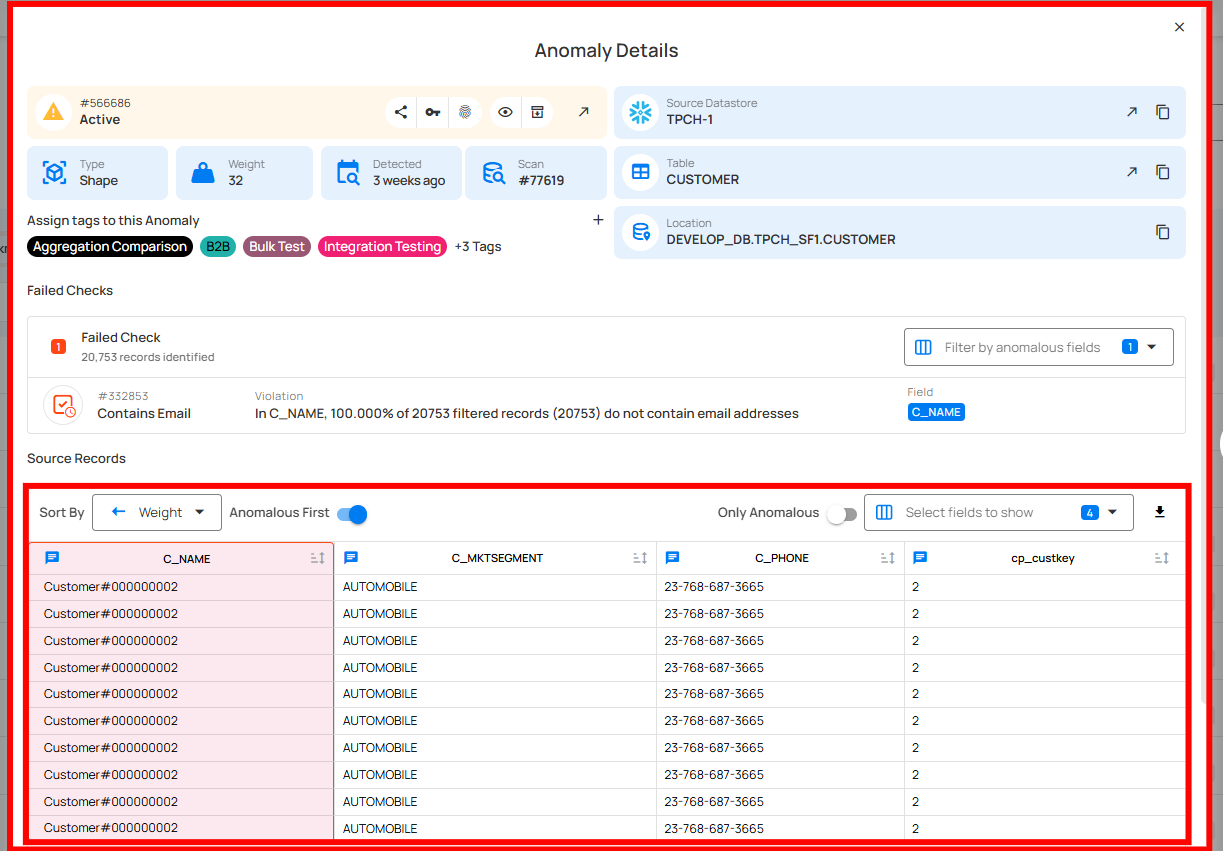
Summary
- Manual review did not scale as data volume increased
- Incorrect values slipped through unnoticed
- The check applied consistent criteria across the Scan scope
- The resulting anomalies gave the team a focused set of records to review
The Outcome
Immediate Benefits:
- The team corrected the rule configuration
- Email validation was applied to the correct data
- The team documented how the rule should be interpreted
Long-Term Benefits:
- Repeatable evaluation for records included in each Scan
- A smaller set of failed records for data stewards to investigate
- Shared context for marketing, support, and data teams
Key Takeaway
The Contains Email check evaluates each record included in a Scan consistently, avoiding the coverage gaps of manual sampling. Data stewards still review failed records and business context to decide whether a value is genuinely incorrect or an accepted exception.
Field Scope
Single: The rule evaluates a single specified field.
Accepted Types
| Type | Supported |
|---|---|
String |
|
Array |
General Properties
| Name | Supported |
|---|---|
Filter Allows the targeting of specific data based on conditions |
|
Coverage Customization Allows adjusting the percentage of records that must meet the rule's conditions |
The filter allows you to define a subset of data upon which the rule will operate.
It requires a valid Spark SQL expression that determines the criteria rows in the DataFrame should meet. This means the expression specifies which rows the DataFrame should include based on those criteria. Since it's applied directly to the Spark DataFrame, traditional SQL constructs like WHERE clauses are not supported.
Examples
Direct Conditions
Simply specify the condition you want to be met.
Combining Conditions
Combine multiple conditions using logical operators like AND and OR.
Correct usage" collapsible="true
Incorrect usage" collapsible="true
Utilizing Functions
Leverage Spark SQL functions to refine and enhance your conditions.
Correct usage" collapsible="true
Incorrect usage" collapsible="true
Using scan-time variables
To refer to the current dataframe being analyzed, use the reserved dynamic variable {{_qualytics_self}}.
Correct usage" collapsible="true
Incorrect usage" collapsible="true
While subqueries can be useful, their application within filters in our context has limitations. For example, directly referencing other containers or the broader target container in such subqueries is not supported. Attempting to do so will result in an error.
Important Note on {{_qualytics_self}}
The {{_qualytics_self}} keyword refers to the dataframe that's currently under examination. In the context of a full scan, this variable represents the entire target container. However, during incremental scans, it only reflects a subset of the target container, capturing just the incremental data. It's crucial to recognize that in such scenarios, using {{_qualytics_self}} may not encompass all entries from the target container.
Anomaly Types
| Type | Supported |
|---|---|
| Record Flag inconsistencies at the row level |
|
| Shape Flag inconsistencies in the overall patterns and distributions of a field |
Example
Objective: Check whether C_CONTACT_DETAILS contains at least one recognizable email pattern for records in the Scan scope.
Sample Data
| C_CUSTKEY | C_CONTACT_DETAILS |
|---|---|
| 1 | {"name": "John Doe", "email": "john.doe@example.com"} |
| 2 | {"name": "Amy Lu", "email": "amy.lu@"} |
| 3 | {"name": "Jane Smith", "email": "jane.smith@domain.org"} |
{
    "description": "Check that C_CONTACT_DETAILS entries contain a recognizable email pattern",
    "coverage": 1,
    "properties": {},
    "tags": [],
    "fields": ["C_CONTACT_DETAILS"],
    "additional_metadata": {"key 1": "value 1", "key 2": "value 2"},
    "rule": "containsEmail",
    "container_id": {container_id},
    "template_id": {template_id},
    "filter": "1=1"
}
Anomaly Explanation
In the sample data above, the entry with C_CUSTKEY 2 does not satisfy the rule because its C_CONTACT_DETAILS value does not follow a typical email format.
graph TD
A[Start] --> B[Retrieve C_CONTACT_DETAILS]
B --> C{Does C_CONTACT_DETAILS contain an email address?}
C -->|Yes| D[Move to Next Record/End]
C -->|No| E[Mark as Anomalous]
E --> DPotential Violation Messages
Record Anomaly
The C_CONTACT_DETAILS value of {"name": "Amy Lu", "email": "amy.lu@"} does not contain an email address.
Shape Anomaly
In C_CONTACT_DETAILS, 33.333% of 3 filtered records (1) do not contain email addresses.