Contains Credit Card
Use the containsCreditCard rule when a sensitive payment field is expected to contain a recognizable credit card number pattern.
What is Contains Credit Card?
Think of Contains Credit Card as a sanity check for payment data.
This rule evaluates whether a selected field contains a recognizable credit card number rather than an empty value, placeholder, or value that does not match its criteria.
In simple terms: It checks whether values match the rule's credit card recognition criteria. It does not confirm that a card account exists, is active, or was used for payment.
Add Contains Credit Card Check
Use the Contains Credit Card check to evaluate payment-related fields and surface records where the expected credit card pattern is missing or not recognized.
What Does Contains Credit Card Do?
It helps you answer questions like:
- “Do the completed orders in this Scan contain a recognizable credit card pattern?”
- “Are payment records missing sensitive fields?”
- “Did upstream systems send incomplete payment data?”
In short: It flags records in the Scan scope where an expected credit card pattern is missing or not recognized.
How Does Contains Credit Card Work?
Step 1: Select the Field
Choose a single field that should contain a credit card number (e.g., CARD_NUMBER).
Step 2: Pattern Validation
Qualytics evaluates each value against the credit card recognition criteria used by the rule.
Step 3: Anomaly Detection
If a record does not meet the configured criteria, it can produce an anomaly, subject to the check's filter and coverage settings.
Step 4: Review Results
You can review exactly which records failed and why.
Real-Life Example: E-commerce Orders
The Situation
An e-commerce company stores order data in the ECOMMERCE_ORDERS table.
Each successful order is expected to include a credit card number in the CARD_NUMBER field.
This data is critical for:
- Payment reconciliation
- Fraud investigation
- Compliance audits
The Problem
Before this check was configured, the data team had to manually review order records to verify whether credit card numbers were present.
This manual process:
- Took significant time during each review
- Did not scale as order volume increased
- Still risked missing incomplete or invalid payment records
The Solution
The team implemented the Contains Credit Card check on the CARD_NUMBER field.
During each Scan, Qualytics evaluates the records in scope and flags orders where the credit card number is missing or does not match the check criteria. Data stewards review those findings and any accepted exceptions before deciding how to resolve them.
What the Check Detected
During the Scan, Qualytics identified 26 anomalous records where the CARD_NUMBER field did not match the rule's credit card criteria, even though the orders were marked as completed.
Output
| CARD_NUMBER | CUSTOMER_EMAIL | PRODUCT_ID | QUANTITY | ORDER_DATE |
|---|---|---|---|---|
| Missing | customer056@example.com | P115 | 1 | 2022-02-01 |
| Missing | customer052@example.com | P111 | -1 | 2022-02-01 |
| Missing | customer048@example.com | P107 | 3 | 2022-01-01 |
| Missing | customer036@example.com | P115 | 1 | 2022-02-01 |
| Missing | customer028@example.com | P107 | 3 | 2022-02-01 |
| Missing | customer020@example.com | P119 | 5 | 2022-02-01 |
| Missing | customer016@example.com | P115 | 1 | 2022-02-01 |
| Missing | customer012@example.com | P111 | 2 | 2022-02-01 |
| Missing | customer008@example.com | P107 | 3 | 2022-02-01 |
| Missing | customer004@example.com | P103 | 4 | 2022-02-01 |
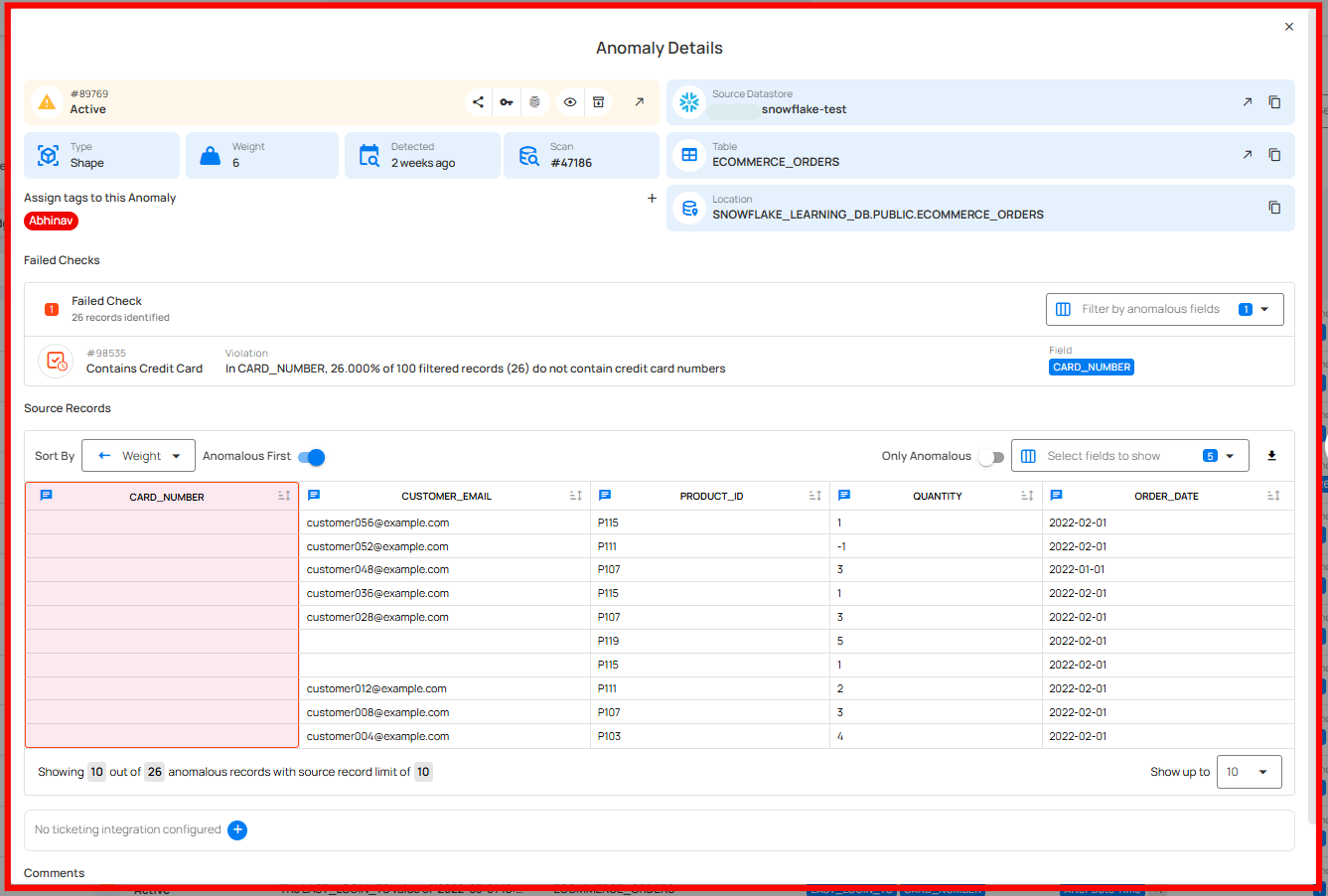
Anomaly Detected
- Rule Applied: Contains Credit Card
- Field: CARD_NUMBER
- Anomalous Records: 26
- Violation: Credit card number not found
Violation Message Example: In CARD_NUMBER, 26.00% of filtered records (26) do not contain credit card numbers.
Why This Matters
Missing or unrecognized payment values can make it harder to:
- Audit payment records
- Investigate potential fraud
- Review evidence required by payment-data policies
- Operate downstream billing systems
The Outcome
After reviewing the Contains Credit Card anomalies:
- The team identified faulty upstream ingestion logic
- Missing card numbers were traced to a failed payment gateway response
- The team routed confirmed ingestion issues to the responsible owner
- The check became a repeatable quality signal for later Scans
When Should You Use Contains Credit Card?
Use this rule when you:
- Validate payment or transaction tables
- Support review under PCI or financial data policies
- Monitor upstream payment integrations
- Surface incomplete payment records for investigation
Key Takeaway
Contains Credit Card provides a repeatable signal about payment-data structure. Teams still confirm the business meaning of each finding and use other controls to establish payment status or compliance.
Field Scope
Single: The rule evaluates a single specified field.
Accepted Types
| Type | Supported |
|---|---|
String |
|
Array |
General Properties
| Name | Supported |
|---|---|
Filter Allows the targeting of specific data based on conditions |
|
Coverage Customization Allows adjusting the percentage of records that must meet the rule's conditions |
The filter allows you to define a subset of data upon which the rule will operate.
It requires a valid Spark SQL expression that determines the criteria rows in the DataFrame should meet. This means the expression specifies which rows the DataFrame should include based on those criteria. Since it's applied directly to the Spark DataFrame, traditional SQL constructs like WHERE clauses are not supported.
Examples
Direct Conditions
Simply specify the condition you want to be met.
Combining Conditions
Combine multiple conditions using logical operators like AND and OR.
Correct usage" collapsible="true
Incorrect usage" collapsible="true
Utilizing Functions
Leverage Spark SQL functions to refine and enhance your conditions.
Correct usage" collapsible="true
Incorrect usage" collapsible="true
Using scan-time variables
To refer to the current dataframe being analyzed, use the reserved dynamic variable {{_qualytics_self}}.
Correct usage" collapsible="true
Incorrect usage" collapsible="true
While subqueries can be useful, their application within filters in our context has limitations. For example, directly referencing other containers or the broader target container in such subqueries is not supported. Attempting to do so will result in an error.
Important Note on {{_qualytics_self}}
The {{_qualytics_self}} keyword refers to the dataframe that's currently under examination. In the context of a full scan, this variable represents the entire target container. However, during incremental scans, it only reflects a subset of the target container, capturing just the incremental data. It's crucial to recognize that in such scenarios, using {{_qualytics_self}} may not encompass all entries from the target container.
Anomaly Types
| Type | Supported |
|---|---|
| Record Flag inconsistencies at the row level |
|
| Shape Flag inconsistencies in the overall patterns and distributions of a field |
Example
Objective: Check whether O_PAYMENT_DETAILS contains a recognizable credit card pattern for records in the Scan scope.
Sample Data
| O_ORDERKEY | O_PAYMENT_DETAILS |
|---|---|
| 1 | {"date": "2023-09-25", "amount": 250.50, "credit_card": "5105105105105100"} |
| 2 | {"date": "2023-09-25", "amount": 150.75, "credit_card": "ABC12345XYZ"} |
| 3 | {"date": "2023-09-25", "amount": 200.00, "credit_card": "4111-1111-1111-1111"} |
{
    "description": "Check that O_PAYMENT_DETAILS contains a recognizable credit card pattern",
    "coverage": 1,
    "properties": {},
    "tags": [],
    "fields": ["C_CCN_JSON"],
    "additional_metadata": {"key 1": "value 1", "key 2": "value 2"},
    "rule": "containsCreditCard",
    "container_id": {container_id},
    "template_id": {template_id},
    "filter": "1=1"
}
Anomaly Explanation
In the sample data above, the entry with O_ORDERKEY 2 violates the rule because O_PAYMENT_DETAILS does not match a recognized credit card pattern.
graph TD
A[Start] --> B[Retrieve O_PAYMENT_DETAILS]
B --> C{Contains Credit Card Number?}
C -->|Yes| D[Move to Next Record/End]
C -->|No| E[Mark as Anomalous]
E --> DPotential Violation Messages
Record Anomaly
The O_PAYMENT_DETAILS value of {"date": "2023-09-25", "amount": 150.75, "credit_card": "ABC12345XYZ"} does not contain a credit card number.
Shape Anomaly
In O_PAYMENT_DETAILS, 33.33% of 3 order records (1) do not contain a credit card number.