Delete Anomaly Action
Use the Delete action to permanently remove anomalies that have been inactive for a set amount of time. This fits cases where you don't need to keep a record of the anomaly, for example short-lived data or noise you just want to clear out.
Why delete instead of archive?
Delete removes the anomaly completely, which is useful when you don’t need to keep any record of it. Looking to keep history? Use Archive instead.
Note
Delete is not the same as Discarded. Discarded is an anomaly status: the anomaly stays in the platform with a "no longer relevant" label. Delete removes the anomaly record entirely.
How It Works
When the parent Flow runs, Delete looks at the anomalies in scope. Any anomaly that has gone the full Inactivity Period with no updates or comments is permanently removed. Filter conditions, when set, narrow the list of candidates.
The action fires whenever the Flow's trigger fires. In most setups that means on a schedule defined in the Trigger Node.
Before You Delete
Running a Delete action permanently removes matching anomalies and has the following effects:
| Effect | Description |
|---|---|
| The anomaly record | The anomaly is permanently removed from the platform. |
| Comments | All comments on the anomaly are also removed. |
| Tag associations | The anomaly's tag associations are removed. The tags themselves remain available for other anomalies. |
| Assignees | Assignment links between the anomaly and users are removed. |
| Linked tickets | Links between the anomaly and external tickets (Jira, ServiceNow) are removed. The tickets in those external systems are not affected. |
| Quality check and datastore counts | Active anomaly counts on the related quality checks and datastores update automatically. |
Warning
This action cannot be undone. Anomalies removed by a Delete action cannot be restored.
Delete Settings
The Delete Settings panel is split into two sections: Configuration and Filter Conditions.
Configuration
Set how long anomalies must stay untouched before they are removed.
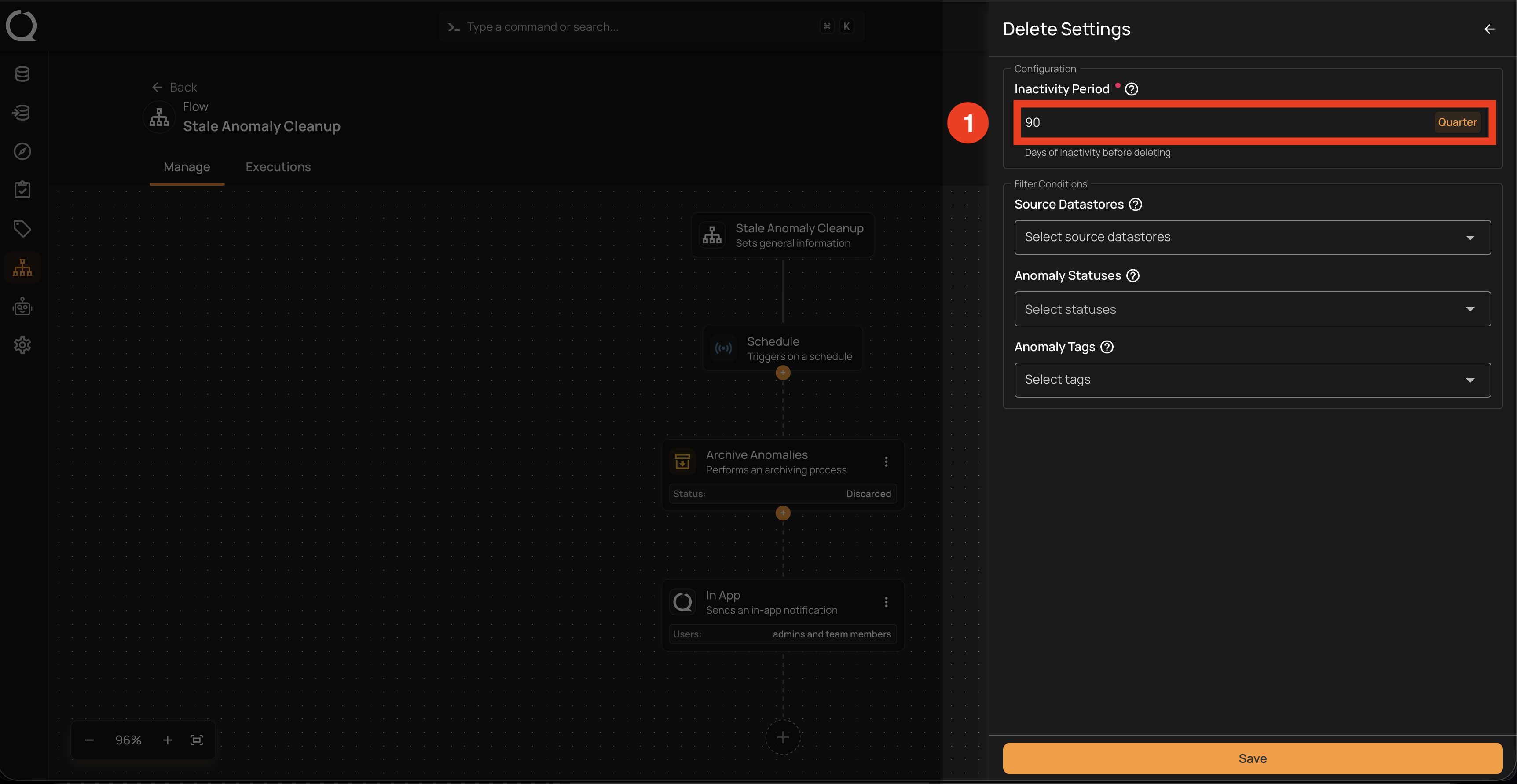
| REF. | Field | Description |
|---|---|---|
| 1 | Inactivity Period (Required) | How long an anomaly must remain untouched (no updates or comments) before it’s deleted. Enter a numeric value and pick a unit from the dropdown. |
Filter Conditions
Narrow down which anomalies are eligible for deletion. All filters must match (AND logic). An anomaly is deleted only if it meets every filter you fill in.
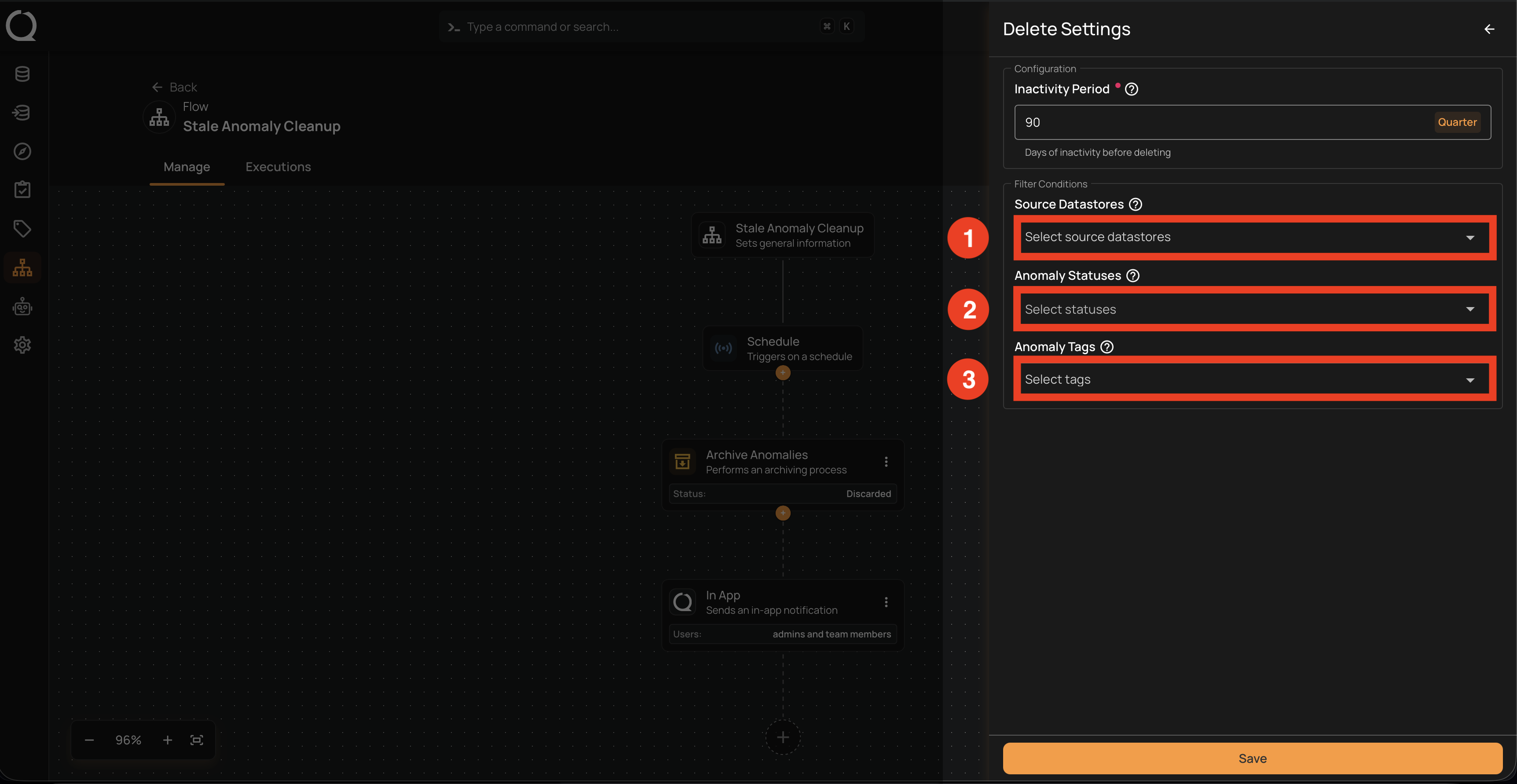
| REF. | Field | Description |
|---|---|---|
| 1 | Source Datastores | Delete only anomalies originating from the selected datastores. Leave empty to consider all datastores. |
| 2 | Anomaly Statuses | Restrict deletion to anomalies in specific statuses. Every status appears in the dropdown, including already-archived ones. Leave empty to target every status. |
| 3 | Anomaly Tags | Delete only anomalies labeled with the selected tags. |
Note
Filter conditions add on top of the Inactivity Period above, not in place of it.