User Profile
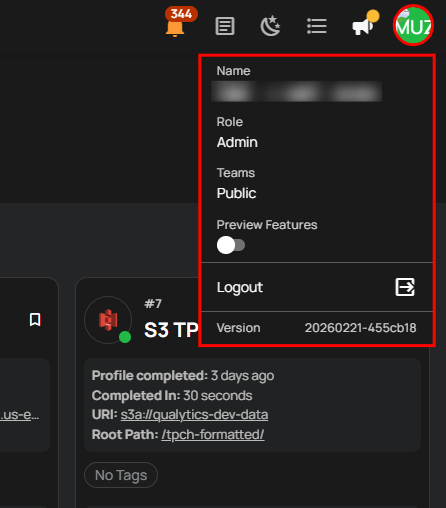
The user profile section in Qualytics provides essential information and settings related to the user's account. Here's an explanation of each element:
-
Name: Displays the user's email address used as the account identifier.
-
Role: Indicates the user's role within the Qualytics platform (e.g., Admin), which defines their level of access and permissions.
-
Teams: Shows the teams to which the user belongs (e.g., Public), helping organize users and manage permissions based on group membership.
-
Preview Features: A toggle switch that enables or disables preview features. When turned on, it adds an AI Readiness Benchmark for the Quality Score specifically on the Explore page.
-
Logout: A button that logs the user out of their Qualytics account, ending the current session and returning them to the login page.
-
Version: Displays the current version of the Qualytics platform being used, which is helpful for troubleshooting and ensuring compatibility with other tools and features.