Contains Social Security Number
Use the Contains Social Security Number rule when a field is expected to store a valid Social Security Number (SSN).
What Is Contains Social Security Number?
Think of Contains Social Security Number as a data integrity guard for sensitive identity fields.
It checks whether a field actually contains a valid SSN, instead of missing, malformed, or incomplete values that may look correct but fail compliance or downstream usage.
In simple terms: It ensures SSN data is present, usable, and consistently formatted.
Add Contains Social Security Number Check
Use this check to validate that a specific field contains a valid SSN and to detect records where the SSN is missing or incorrectly stored.
What Does This Check Do?
The rule scans a single field and confirms:
- An SSN value exists
- The SSN follows a recognizable pattern (for example:
XXX-XX-XXXX) - The value is not null, truncated, or malformed
If a record fails any of these conditions, it is flagged as an anomaly.
How Does Contains Social Security Number Work?
Step 1: Select the Field
Choose the field that is expected to contain an SSN (for example: C_SSN).
Step 2: Validate the Content
Qualytics verifies whether the field value matches a valid SSN format.
Step 3: Review the Results
- Pass – Field contains a valid SSN
- Fail – SSN is missing, malformed, or not detected
Why Should You Use This Check?
1. Prevent Compliance Gaps
Missing or invalid SSNs can lead to regulatory violations, audit failures, and processing issues.
2. Catch Issues Early
Instead of discovering problems during reporting or audits, this check flags them as soon as data is scanned.
3. Protect Sensitive Workflows
Payroll, identity verification, and compliance systems depend on accurate SSN data. This rule helps keep those workflows reliable.
Real-Life Example: Customer Identity Data Validation
The Situation
BrightMart is a retail company that maintains a central customer database containing identity information required for compliance and verification.
Each customer record is expected to include a valid Social Security Number (SSN).
This data is used for:
- Customer identity verification
- Regulatory and compliance reporting
- Internal audits and analytics
The Problem They Had
As BrightMart’s customer base grew, the data team relied on manual reviews to verify SSN values.
During a routine compliance review, the team noticed that some customer records could not be validated, even though SSN data appeared to be present. This raised an important question:
Why are some records failing verification when they seem correct at first glance?
After investigating, the team discovered:
- Some SSN values were missing or empty
- Some values were incorrectly structured
- Manually reviewing thousands of records took significant time
- Human review made it easy to miss subtle issues
These problems had gone unnoticed for weeks, creating a serious compliance risk and delaying reporting.
The Solution: Contains Social Security Number
To eliminate manual checks, the team implemented the Contains Social Security Number rule type.
Instead of reviewing records one by one, the rule automatically scanned all customer records and validated whether each one actually contained a valid SSN.
What the Check Reviewed
After running the check, Qualytics produced the following Source Records view. Records that failed SSN validation were automatically highlighted, making them easy to identify.
| C_SSN_JSON | _CHECKSUM | C_CUSTKEY |
|---|---|---|
| { "ssn": "966-15-3666" } | 00a7b86dc440f5799515d58dafdb5be | 43661 |
| { "ssn": "938-35-4653" } | 0097c6fd693f6b42207cf0cfa38f53d | 93248 |
| { "ssn": "980-04-5020" } | 009abea2080b1713b168bc998c52f0f | 83639 |
| { "ssn": "918-58-8770" } | 0076beb855ab8742a5b0ef7fc1442b | 131926 |
| { "ssn": "933-20-6278" } | 006b9646dcba176709eb7a322e61e2b7 | 21691 |
| { "ssn": "989-09-1445" } | 00650747d878eeca4d468a880de38b2 | 11860 |
| { "ssn": "963-62-7104" } | 0061f5779e53186143b077a516e5a0c4 | 137432 |
| { "ssn": "961-06-0718" } | 004bd16c4a27e11bed1d9e9d13d94c9 | 126126 |
| { "ssn": "913-38-6794" } | 004881ebe3826fc16cfd124968f2a5bb | 12223 |
| { "ssn": "796-00-1624" } | 001d507e80c4e4d2ce4aba05590f8313 | 80971 |
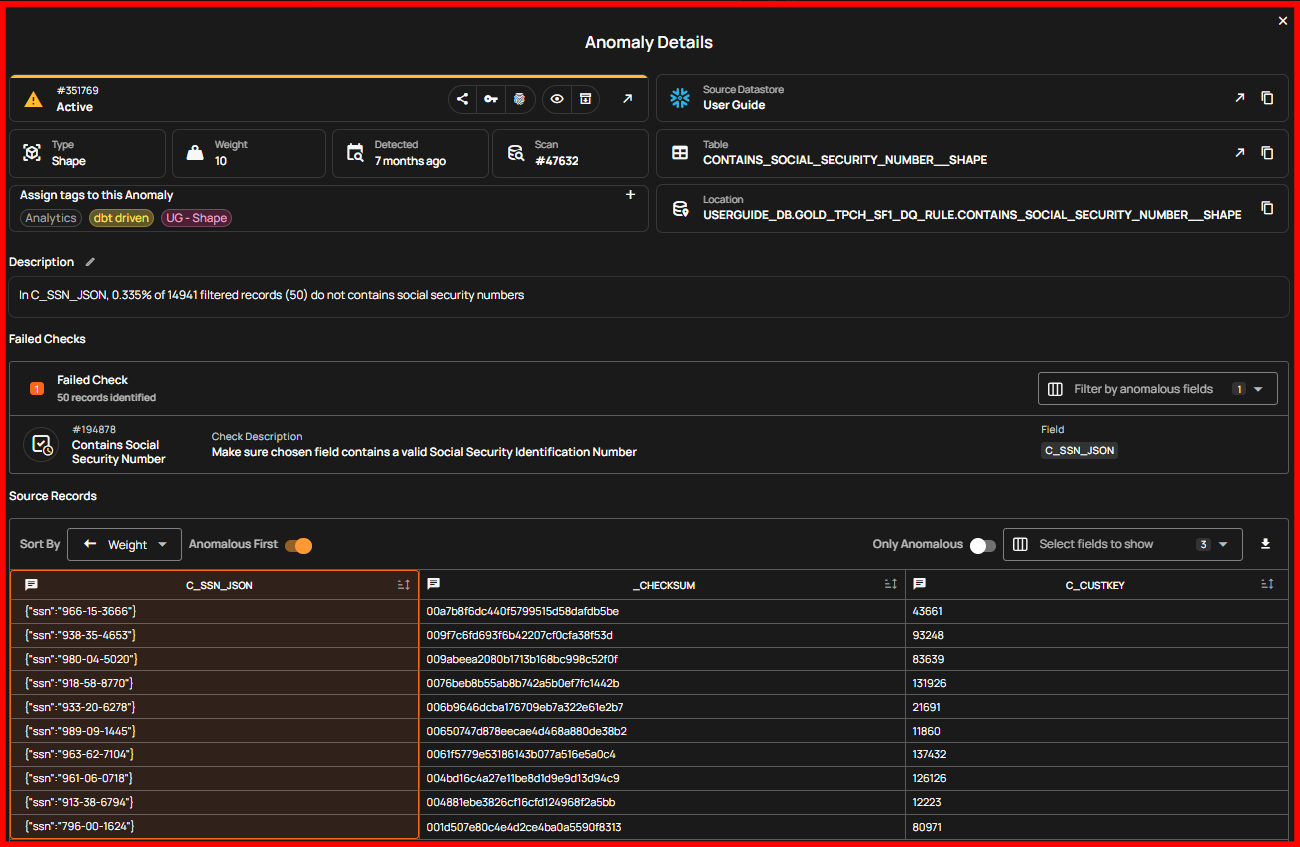
What Contains Social Security Number Discovered
ALERT GENERATED:
SSN VALIDATION FAILED
- Rule Applied: Contains Social Security Number
- Anomalous Records: 50
- Violation Rate: 0.335% of 14,941 records
Although the failure rate was small, each failed record represented a potential compliance issue.
🔍 Summary
- Most customer records contained valid SSNs
- A small but critical subset did not meet SSN requirements
- The failed records were clearly marked in red, eliminating guesswork
The Outcome
Immediate Benefits
- Manual SSN reviews were eliminated
- Invalid records were identified instantly
- Review time dropped from hours to minutes
Long-Term Benefits
- Continuous monitoring of SSN data quality
- Reduced audit and compliance risk
- Higher confidence in customer identity data
Why This Matters
Just like missing orders can impact revenue, missing or invalid SSNs can impact compliance.
The Contains Social Security Number check acts as an automated safeguard—ensuring sensitive identity data is always complete, valid, and audit-ready, without relying on slow and error-prone manual reviews.
Field Scope
Single: The rule evaluates a single specified field.
Accepted Types
| Type | |
|---|---|
String |
General Properties
| Name | Supported |
|---|---|
Filter Allows the targeting of specific data based on conditions |
|
Coverage Customization Allows adjusting the percentage of records that must meet the rule's conditions |
The filter allows you to define a subset of data upon which the rule will operate.
It requires a valid Spark SQL expression that determines the criteria rows in the DataFrame should meet. This means the expression specifies which rows the DataFrame should include based on those criteria. Since it's applied directly to the Spark DataFrame, traditional SQL constructs like WHERE clauses are not supported.
Examples
Direct Conditions
Simply specify the condition you want to be met.
Combining Conditions
Combine multiple conditions using logical operators like AND and OR.
Correct usage" collapsible="true
Incorrect usage" collapsible="true
Utilizing Functions
Leverage Spark SQL functions to refine and enhance your conditions.
Correct usage" collapsible="true
Incorrect usage" collapsible="true
Using scan-time variables
To refer to the current dataframe being analyzed, use the reserved dynamic variable {{ _qualytics_self }}.
Correct usage" collapsible="true
Incorrect usage" collapsible="true
While subqueries can be useful, their application within filters in our context has limitations. For example, directly referencing other containers or the broader target container in such subqueries is not supported. Attempting to do so will result in an error.
Important Note on {{ _qualytics_self }}
The {{ _qualytics_self }} keyword refers to the dataframe that's currently under examination. In the context of a full scan, this variable represents the entire target container. However, during incremental scans, it only reflects a subset of the target container, capturing just the incremental data. It's crucial to recognize that in such scenarios, using {{ _qualytics_self }} may not encompass all entries from the target container.
Anomaly Types
| Type | Supported |
|---|---|
Record Flag inconsistencies at the row level |
|
Shape Flag inconsistencies in the overall patterns and distributions of a field |
Example
Objective: Ensure that all C_CONTACT_DETAILS entries in the CUSTOMER table contain valid social security numbers.
Sample Data
| C_CUSTKEY | C_CONTACT_DETAILS |
|---|---|
| 1 | {"name": "John Doe", "ssn": "234567890"} |
| 2 | {"name": "Amy Lu", "ssn": "666-12-3456"} |
| 3 | {"name": "Jane Smith", "ssn": "429-14-2216"} |
{
    "description": "Ensure that all C_CONTACT_DETAILS entries in the CUSTOMER table contain valid social security numbers",
    "coverage": 1,
    "properties": {},
    "tags": [],
    "fields": ["C_CONTACT_DETAILS"],
    "additional_metadata": {"key 1": "value 1", "key 2": "value 2"},
    "rule": "containsSocialSecurityNumber",
    "container_id": {container_id},
    "template_id": {template_id},
    "filter": "1=1"
}
Anomaly Explanation
In the sample data above, the entry with C_CUSTKEY 2 does not satisfy the rule because its C_CONTACT_DETAILS value does not contain the typical social security number format.
graph TD
A[Start] --> B[Retrieve C_CONTACT_DETAILS]
B --> C{Does C_CONTACT_DETAILS contain a valid SSN format?}
C -->|Yes| D[Move to Next Record/End]
C -->|No| E[Mark as Anomalous]
E --> DPotential Violation Messages
Record Anomaly
The C_CONTACT_DETAILS value of {"name": "Amy Lu", "ssn": "666-12-3456"} does not contain a social security number.
Shape Anomaly
In C_CONTACT_DETAILS, 33.333% of 3 filtered records (1) do not contain social security numbers.